Friday, April 5, 2013

SQL2008R2: Error-Model database ldf file missing- Database 'model' cannot be opened due to inaccessible files or insufficient memory or disk space.

While trying to restart SQL service, I am getting the below error message.

Then I had a look in the error log file. (Refer below section)
2013-03-14 10:56:06.95 Server      Microsoft SQL Server 2008 R2 (RTM) - 10.50.1600.1 (Intel X86)
                Apr  2 2010 15:53:02
                Copyright (c) Microsoft Corporation
                Developer Edition on Windows NT 5.1 <X86> (Build 2600: Service Pack 3)

2013-03-14 10:56:06.95 Server      (c) Microsoft Corporation.
2013-03-14 10:56:06.95 Server      All rights reserved.
2013-03-14 10:56:06.95 Server      Server process ID is 26684.
2013-03-14 10:56:06.95 Server      Authentication mode is MIXED.
2013-03-14 10:56:06.95 Server      Logging SQL Server messages in file 'C:\Program Files\Microsoft SQL Server\MSSQL10_50.SQL2008R2\MSSQL\Log\ERRORLOG'.
2013-03-14 10:56:06.95 Server      This instance of SQL Server last reported using a process ID of 16596 at 14/03/2013 10:55:54 (local) 14/03/2013 10:55:54 (UTC). This is an informational message only; no user action is required.
2013-03-14 10:56:06.96 Server      Registry startup parameters:
                 -d C:\Program Files\Microsoft SQL Server\MSSQL10_50.SQL2008R2\MSSQL\DATA\master.mdf
                 -e C:\Program Files\Microsoft SQL Server\MSSQL10_50.SQL2008R2\MSSQL\Log\ERRORLOG
                 -l C:\Program Files\Microsoft SQL Server\MSSQL10_50.SQL2008R2\MSSQL\DATA\mastlog.ldf
2013-03-14 10:56:06.97 Server      SQL Server is starting at normal priority base (=7). This is an informational message only. No user action is required.
2013-03-14 10:56:06.97 Server      Detected 2 CPUs. This is an informational message; no user action is required.
2013-03-14 10:56:07.76 Server      Using dynamic lock allocation.  Initial allocation of 2500 Lock blocks and 5000 Lock Owner blocks per node.  This is an informational message only.  No user action is required.
2013-03-14 10:56:07.93 Server      Node configuration: node 0: CPU mask: 0x00000003:0 Active CPU mask: 0x00000003:0. This message provides a description of the NUMA configuration for this computer. This is an informational message only. No user action is required.
2013-03-14 10:56:07.98 spid7s      Starting up database 'master'.
2013-03-14 10:56:07.99 spid7s      Error: 17207, Severity: 16, State: 1.
2013-03-14 10:56:07.99 spid7s      FCB::RemoveAlternateStreamsByHandle(BackupSeek): Operating system error 6(failed to retrieve text for this error. Reason: 1815) occurred while creating or opening file 'C:\Program Files\Microsoft SQL Server\MSSQL10_50.SQL2008R2\MSSQL\DATA\master.mdf'. Diagnose and correct the operating system error, and retry the operation.
2013-03-14 10:56:08.17 spid7s      Resource governor reconfiguration succeeded.
2013-03-14 10:56:08.17 spid7s      SQL Server Audit is starting the audits. This is an informational message. No user action is required.
2013-03-14 10:56:08.20 spid7s      SQL Server Audit has started the audits. This is an informational message. No user action is required.
2013-03-14 10:56:08.21 spid7s      FILESTREAM: effective level = 0, configured level = 0, file system access share name = 'SQL2008R2'.
2013-03-14 10:56:08.25 spid7s      SQL Trace ID 1 was started by login "sa".
2013-03-14 10:56:08.26 spid7s      Starting up database 'mssqlsystemresource'.
2013-03-14 10:56:08.30 spid7s      The resource database build version is 10.50.1600. This is an informational message only. No user action is required.
2013-03-14 10:56:08.60 spid10s     Starting up database 'model'.
2013-03-14 10:56:08.61 spid7s      Server name is ‘servername’. This is an informational message only. No user action is required.
2013-03-14 10:56:08.63 spid10s     Error: 17207, Severity: 16, State: 1.
2013-03-14 10:56:08.63 spid10s     FCB::RemoveAlternateStreamsByHandle(BackupSeek): Operating system error (null) occurred while creating or opening file 'C:\Program Files\Microsoft SQL Server\MSSQL10_50.SQL2008R2\MSSQL\DATA\model.mdf'. Diagnose and correct the operating system error, and retry the operation.
2013-03-14 10:56:08.78 spid10s     Error: 17207, Severity: 16, State: 1.
2013-03-14 10:56:08.78 spid10s     FileMgr::StartLogFiles: Operating system error 2(failed to retrieve text for this error. Reason: 1815) occurred while creating or opening file 'C:\Program Files\Microsoft SQL Server\MSSQL10_50.SQL2008R2\MSSQL\DATA\modellog.ldf'. Diagnose and correct the operating system error, and retry the operation.
2013-03-14 10:56:08.79 spid10s     File activation failure. The physical file name "C:\Program Files\Microsoft SQL Server\MSSQL10_50.SQL2008R2\MSSQL\DATA\modellog.ldf" may be incorrect.
2013-03-14 10:56:08.79 spid10s     Error: 945, Severity: 14, State: 2.
2013-03-14 10:56:08.79 spid10s     Database 'model' cannot be opened due to inaccessible files or insufficient memory or disk space.  See the SQL Server errorlog for details.
2013-03-14 10:56:08.79 spid10s     Could not create tempdb. You may not have enough disk space available. Free additional disk space by deleting other files on the tempdb drive and then restart SQL Server. Check for additional errors in the event log that may indicate why the tempdb files could not be initialized.
2013-03-14 10:56:08.79 spid10s     SQL Trace was stopped due to server shutdown. Trace ID = '1'. This is an informational message only; no user action is required.

Solution:
Step 1: Look for the model database backup
Step 2: Restore the same to some other server by the following query in some other name.
RESTORE DATABASE [ModelTemp] FROM
 DISK = N'C:\Documents and Settings\T001855\Desktop\Backup Model_Full_Backup.bak'
WITH  FILE = 1, 
MOVE N'modeldev'
TO N'C:\Program Files\Microsoft SQL Server\MSSQL10_50.SQL2008R2\MSSQL\DATA\ModelTemp.mdf',
  MOVE N'modellog'
  TO N'C:\Program Files\Microsoft SQL Server\MSSQL10_50.SQL2008R2\MSSQL\DATA\ModelTemp_1.ldf',
  NOUNLOAD,  STATS = 10
GO

Step 3: Stop the SQL services of other server to copy the recently restored modeltemp database mdf and ldf files to the problem server.
Refer below screenshot.

Step 4: Rename the old model database files to some other name like model111 if it exists, then change the modeltemp.mdf and modeltemp.ldf to model.mdf and model.ldf.
 Step 5: Finally restart the SQL services. SQL services will restart without issues.
 

Thursday, April 4, 2013

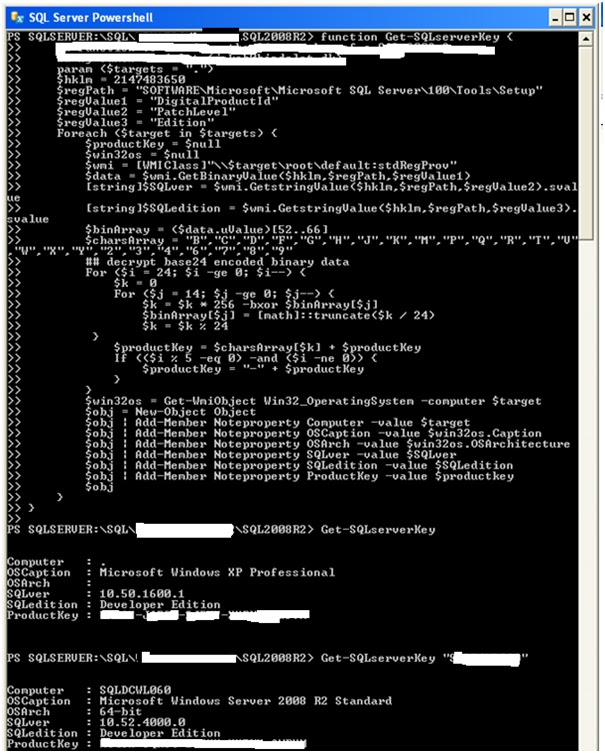
SQL2008R2: License Key of an SQL Server instance by Powershell


Step1: Navigate to the Powershell by Right Click SQL Server ->Start Powershell.

Step2: Then write the below function in the Powershell.

function Get-SQLserverKey {
     param ($targets = ".")
    $hklm = 2147483650
    $regPath = "SOFTWARE\Microsoft\Microsoft SQL Server\100\Tools\Setup"
    $regValue1 = "DigitalProductId"
    $regValue2 = "PatchLevel"
    $regValue3 = "Edition"
    Foreach ($target in $targets) {
        $productKey = $null
        $win32os = $null
        $wmi = [WMIClass]"\\$target\root\default:stdRegProv"
        $data = $wmi.GetBinaryValue($hklm,$regPath,$regValue1)
        [string]$SQLver = $wmi.GetstringValue($hklm,$regPath,$regValue2).svalue
        [string]$SQLedition = $wmi.GetstringValue($hklm,$regPath,$regValue3).svalue
        $binArray = ($data.uValue)[52..66]
        $charsArray = "B","C","D","F","G","H","J","K","M","P","Q","R","T","V","W","X","Y","2","3","4","6","7","8","9"
        ## decrypt base24 encoded binary data
        For ($i = 24; $i -ge 0; $i--) {
            $k = 0
            For ($j = 14; $j -ge 0; $j--) {
                $k = $k * 256 -bxor $binArray[$j]
                $binArray[$j] = [math]::truncate($k / 24)
                $k = $k % 24
         }
            $productKey = $charsArray[$k] + $productKey
            If (($i % 5 -eq 0) -and ($i -ne 0)) {
                $productKey = "-" + $productKey
            }
        }
        $win32os = Get-WmiObject Win32_OperatingSystem -computer $target
        $obj = New-Object Object
        $obj | Add-Member Noteproperty Computer -value $target
        $obj | Add-Member Noteproperty OSCaption -value $win32os.Caption
        $obj | Add-Member Noteproperty OSArch -value $win32os.OSArchitecture
        $obj | Add-Member Noteproperty SQLver -value $SQLver
        $obj | Add-Member Noteproperty SQLedition -value $SQLedition
        $obj | Add-Member Noteproperty ProductKey -value $productkey
        $obj
    }
}


Step 3: Then call the below function to know the Sql server key for the local and remote instances.

PS SQLSERVER:\SQL\LOCALSERVERNAME\SQL2008R2> Get-SQLserverKey

Output:
Computer   : .
OSCaption  : Microsoft Windows XP Professional
OSArch     :
SQLver     : 10.50.1600.1
SQLedition : Developer Edition
ProductKey : XXXXX-FFFFF-CCCCC-EEEEE-RRRRR

PS SQLSERVER:\SQL\LOCALSERVERNAME\SQL2008R2> Get-SQLserverKey "RemoteSqlServerName"

Output:
Computer   : SQLDCWL060
OSCaption  : Microsoft Windows Server 2008 R2 Standard
OSArch     : 64-bit
SQLver     : 10.52.4000.0
SQLedition : Developer Edition
ProductKey : XXXXX-FFFFF-CCCCC-EEEEE-RRRRR


Refer the below screenshot to code it in Powershell.


Wednesday, March 27, 2013

SSRS 2008R2-Tablix report header not repeating


Error: Tablix report header not repeating

Solution: Follow the below steps to show report header in the tablix reports.

1. Go to the Column Groups and right click the triangle ->Then check the Advanced Mode.


2. Next Come to the Row Groups and Click F4 to see the properties.


3. Set the following properties in the tablix member as per the highlighted green colour box.

·         Fixed data to ‘True’
·         Keep with Group to 'After'
·         Repeat on New Page to 'True'


5. Then Save the report and Preview.

As expected, the report features like Repeat headers on Each Page and header visible while scrolling is working fine!

Thursday, March 21, 2013

Remove characters from left of string-SSRS 2008R2-Expression-Tablix Report


Scenario: I am looking to remove the characters value ‘SQL Server’ from the ‘SQL Server 9.00.4060.00’   in one column on the tablix report in SSRS report. How do we achieve that output?

Solution: Go to Business Intelligence (SSRS) ->File->New Project->Report server project.
Then Drag and Drop table control ->Drag and drop the required columns from the dataset (Set Query for fetching data) to show in the table report.
Next right click the data value of the specific column to change the expression as like below.


Then enter the expression values as like below.


=Right( Fields!products.Value, len(Fields!products.Value) - 10)


·         Fields!products.Value is the datavalue in the tablix column.
·         Right is used to remove the left side characters based on the second parameters value.
·         10 is the number of characters removed from the actual value.


Finally click ok.

Then preview the report as shown below. In the below tablix report output, SQL server is removed and only ‘2005 Service pack3 ‘is coming.

Output:


Wednesday, February 20, 2013

SQL Server 2008R2:Database Snapshot uses --Database Mirroring

How to verify the data is mirrored from principal database to mirror database in the existing DATABASE MIRRORING (use of DATABASE SNAPSHOT).


Step1: Create a new table in the principal server database and insert data into it by the following statement.

USE [Kumar]
GO
/****** Object: Table [dbo].[Tbl_mirror_test] Script Date: 02/14/2013 19:48:34 ******/
SET ANSI_NULLS ON
GO
SET QUOTED_IDENTIFIER ON
GO
CREATE TABLE [dbo].[Tbl_mirror_test](
[ID] [int] IDENTITY(1,1) NOT NULL,
[Event] [nvarchar](50) NULL
) ON [PRIMARY]
GO
INSERT INTO [Kumar].[dbo].[ Tbl_mirror_test]
([Event])
VALUES
(‘Kabbadi Match’)
GO

Step 2: Then create a database snapshot in the mirror server (Ensure your SQL server supports database snapshot feature) by the following statement.

CREATE DATABASE SnapshotDB007 ON
( NAME = Kumar_Data, FILENAME = 'G:\ Kumar _Data_22.ss' )
AS SNAPSHOT OF Kumar
GO

/************
SnapshotDB007--> the snaphshot name

Kumar_Data-->logical file name for the mdf file of Kumar database.

G:\ Kumar _Data_22.ss-->you can mention any filename in any path to store snapshot.

SNAPSHOT OF Kumar -->specifies which database needs to be snapshot**********/

Step 3: Fetch the updated data by executing the following statement in the mirror server.

select * from SnapshotDB007.dbo.Tbl_ mirror _Test

Output:
Kabbadi Match

If you try to drop the database 'Kumar',it wont allow to drop until you remove the associated database snapshot by the below method.

DROP DATABASE Kumar

Error:
Msg 3709, Level 16, State 2, Line 2
Cannot drop the database while the database snapshot "SnapshotDB" refers to it. Drop that database first.

USE [master]
GO
/****** Object: Database [SnapshotDB] Script Date: 02/14/2013 13:32:28 ******/
IF EXISTS (SELECT name FROM sys.databases WHERE name = N'SnapshotDB')
DROP DATABASE [SnapshotDB]
GO

Note:

We have no options to create database snapshot by wizard in the Sql Server Management Studio.(Refer the below image).


Hope you can verify the database mirroring data by the above method.If you know any other method,please Submit a comment!!!!!!!

MYSQL::Setting Validate_Password componet for MySQL Database to ensure password policy settings

Inadequate Password Settings for MySQL Database We observed that the `validate_password%` settings on hostname `<insert hostname>` a...