Wednesday, October 10, 2012

SSIS2008R2 Error: 0xC0209303 at Package:


When i trying to load data from MS access (MDB) to SQL ,i am getting the below error.

Error: 0xC0209303 at Package, Connection manager "mdbfilename": SSIS Error Code DTS_E_OLEDB_NOPROVIDER_64BIT_ERROR.  The requested OLE DB provider Microsoft.Jet.OLEDB.4.0 is not registered -- perhaps no 64-bit provider is available.  Error code: 0x00000000.
An OLE DB record is available.  Source: "Microsoft OLE DB Service Components"  Hresult: 0x80040154  Description: "Class not registered".
Error: 0xC020801C at Data Flow Task mdbfilename, OLE DB Source [1]: SSIS Error Code DTS_E_CANNOTACQUIRECONNECTIONFROMCONNECTIONMANAGER.  The AcquireConnection method call to the connection manager " mdbfilename " failed with error code 0xC0209303.  There may be error messages posted before this with more information on why the AcquireConnection method call failed.
Error: 0xC0047017 at Data Flow Task mdbfilename, SSIS.Pipeline: component "OLE DB Source" (1) failed validation and returned error code 0xC020801C.

Resolution:

It seems that SSIS project are now on a 64 bit machine. And that there is no 64 bit OLE DB provider Microsoft.Jet.OLEDB.4.0.So the fix is in running this project under 32 bit modes

Go to the SSIS project properties page
          à Then Click Debugging under configuration properties
          àSelect “Run64BitRuntime” property to false
          àSave the project
                              ->RUN Build again
          àThen check the package runs to a successful completion.

That's it.

How to find the SQLlogins have proper password except blank,samelogin name as password And ‘password’ as password?


--To find the blank password set for any sql logins.
--PWDCOMPARE Hashes a password and compares the hash to the    hash of an existing password.   PWDCOMPARE can be used to search for blank SQL Server login passwords or common weak passwords.

SELECT name FROM sys.sql_logins
WHERE PWDCOMPARE('', password_hash) = 1 ;

--To find the password set as like the same name of sql login name    for any sql logins.

SELECT name FROM sys.sql_logins
WHERE PWDCOMPARE(name, password_hash) = 1 ;

--To find the password set as like 'password' for sql logins

SELECT name FROM sys.sql_logins
WHERE PWDCOMPARE('password', password_hash) = 1 ;

Hope you can search for blank SQL Server login passwords or common weak passwords with above query.

Wednesday, June 27, 2012

SSRS Configuration step by step(SQL SERVER REPORTING SERVICES)

Step1.Click Start->All Programs->Microsoft SQL Server->Configuration Tools->Reporting Service Configuration Manager.

Reporting service configuartion dialog box opens(Below Figure )


Step2.Specify the Server Name and report server instance.Click Connect buttton.

Reporting Service Configuaration Manager window opens to show the status of  current report server instance.


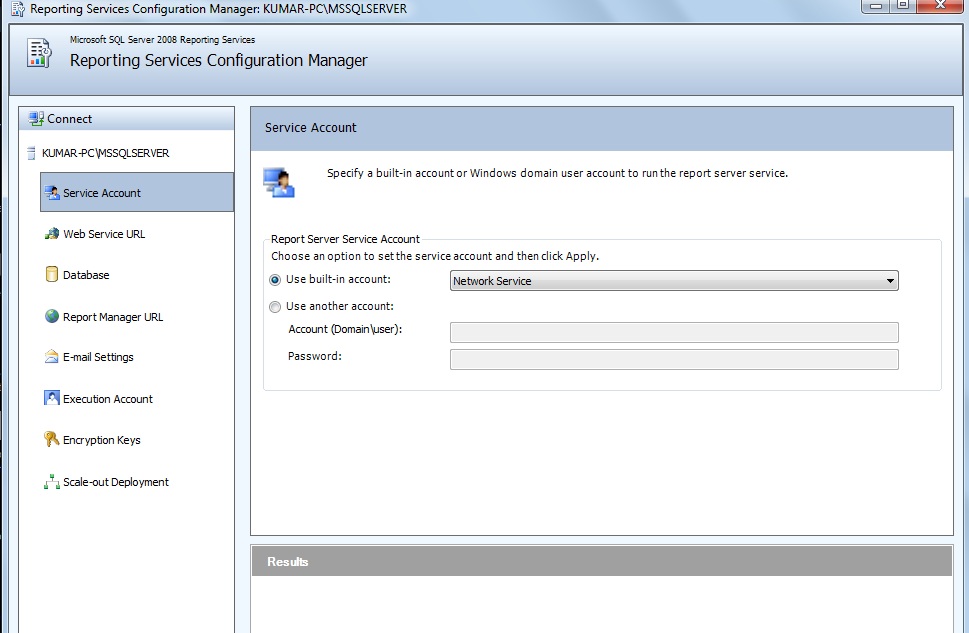
Step3.Select Service account tab from the left pane of RSCM window to open the service account page.


You can get an option choose service account by choosing the radio button in the above figuure and Click Apply Button.

Step4.Select the Web Service URl tab from the left pane of RSCM window to open the Web Service URL Page as shown in the below figure.


Configure URL to access the report server and also you can specify more than one URL to access the same Report Server.
Then Click Apply Button.

Step5.Select Database tab from the left pane of RSCM window to open the Database page as shown in the below figure.


Above figure shows the report server database and report server database credentials.Here we can able to sepcify a new database for the report server and can also change the credentials.

Step6.Select Report Manager URL tab from the left pane of the RSCM window to open the Report Manager URL page as shown in the below figure


Here we can configure a URL to access Report Manager.You can also specify multiple URLs for Report Manager by clicking the advanced button.

Step7.Email Account as per below figure allows us to configure the Email settings for a report server.Here we can able to specify an existing SMTP server and an email account for sending emails from that server.


Next Execution Account tab allows us to specify an account to enable us to use report datasources that do not require credentials.
This account allows to store external images used in reports.

Next Encryption Keys Tab allows us to backup,restore and change the symmetric key that is used by SSRS to encrypt credentials and connection strings stored in the report server database.

Finally Scale Out Deployment tab allows you to specify settings enables to multiple report servers to use a single,shared report server database.

Happy SSRS Configuration setup.

Tuesday, May 29, 2012

Three different ways to find blocking in SQL


SP_WHO2
It shows blocking by the presence of blkby column value.
Sysprocesses
select * from master..sysprocesses where blocked >0
Activity Monitor
Open Activity Monitor at any time by pressing CTRL+ALT A.

Difference between 3 types of Restoring modes.


S.No
With Recovery
With Norecovery
Standby\Readonly
1
Leave the database in online mode.
Leave the database in restoring mode.
Leave the database in
 readonly mode.
2
No further restore is possible.
Further restore is possible.
3
User can able to access
Users can’t.
Users can able to read the
 databases.
4
Rollback the uncommitted transactions
Does not rollback the uncommitted transactions
It undoes uncommitted transactions
, but saves the undo actions in a
 standby file so that recovery effects
 can be reverted.


Difference between database roles and server roles

S.No
Server Roles
Database Roles
1
It is defined at the server level.
It is defined at the database level.
2
It exists outside of user databases.
It exists in each database.
3
There are fixed server roles only.
User defined database roles available.
4
Bulkadmin,dbcreator,diskadmin,
processadmin,securityadmin,
serveradmin,setupadmin and sysadmin(8)
Db_accesadmin,db_backupoperator,
db_datareader,db_datawriter,
db_ddladmin,db_denydatareader,
db_denydatawriter,db_owner and db_securityadmin(9)


Differences between SQL2000,SQL2005 and SQL2008.


S.No
SQL 2000
SQL2005
SQL2008
1
Query Analyzer and Enterprise Manager are separate.
Both are combined as SQL SERVER MANAGEMEN STUDIO.
2
No XML datatype is used.
XML datatype is introduced.
XML datatype is used.
3
65,535 databases can be created.
2(pow(20))-1 databases can be created.
4
Nill
Exception handling
Exception handling
5
Nill
Varchar(Max) datatype
6
Nill
DDL Triggers
DDL Triggers
7
Nill
Database mirroring
Database mirroring
8
Nill
Row number function for paging use.
9
Nill
Table fragmentation
Table fragmentation
10
Nill
Full text search
Full text search
11
Nill
Bulk copy update
Bulk copy update
12
Nill
Can’t encrypt
Can encrypt entire database
13
Compression not possible
Can compress tables and indexes(introduced in 2005 SP2)
Can compress tables and indexes
14
Datetime is used for both date and time
Date and time are separately used for date and time datatype
15
Nill
Narchar(max) and varbinary(max) is used.
16
Nill
Nill
Table datatype is introduced.
17
Nill
 SSIS is used.
SSIS is used.
18
Nill
Nill
Central Management Server(CMS) is introduced.
19
Nill
Nill
Policy based management is available.

MYSQL::Setting Validate_Password componet for MySQL Database to ensure password policy settings

Inadequate Password Settings for MySQL Database We observed that the `validate_password%` settings on hostname `<insert hostname>` a...